Apple last updated the Mac Pro in June 2023, adding an M2 Ultra chip and officially completing the transition away from Intel chips. The Mac Pro uses the same M2 Ultra chip that's in the Mac Studio, leading to criticism about its lack of power.
Apple has now gone back to the drawing board and is working on an updated version of the Mac Pro that's set to come out next year. This guide highlights everything we know about Apple's Mac Pro progress.
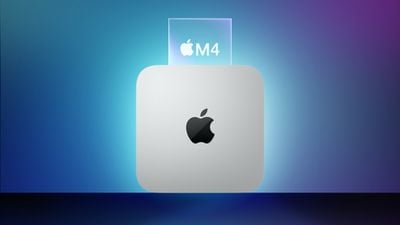
M4 Chip
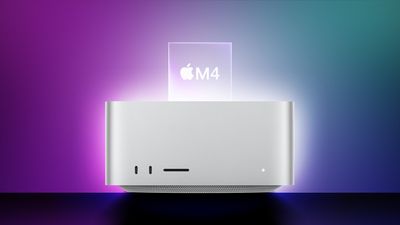
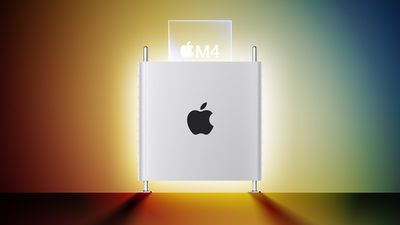
The next Mac Pro will have a chip that's in the M4 family, as Apple is working to update its entire Mac lineup to the M4 series across 2024 and 2025.
Bloomberg's Mark Gurman believes that Apple wants to establish a more regular Apple silicon chip upgrade cycle that would perhaps see Mac chips refreshed on an annual basis much like chips designed for the iPhone.
Gurman says that the Mac Pro will be equipped with the highest-end version of the M4 chip, which is codenamed "Hidra." Hidra is likely equivalent to an "Ultra" chip based on the way that Apple has differentiated its chips in the past. The Mac Pro is aimed at professional videographers, photographers, designers, and others who need significant processing power, and some pro users are said to have been unhappy with the M2 Ultra Mac Pro.
As a result, Apple is looking to make the M4 Mac Pro more powerful.
All of the M4 chips will be designed with a focus on artificial intelligence, with Apple aiming to highlight the AI processing capabilities of the chips and how they'll integrate into macOS. Apple is adding AI features that will run solely on device to the next operating system updates, so the M4 chips will need to have a lot of compute power.
Rumors suggest that the M4 chips will feature an upgraded Neural Engine with more cores to handle AI tasks.
Unified Memory
The Mac Pro could support up to 500GB Unified Memory, way up from the current 192GB maximum.
Will there be an M3 Mac Pro?
It doesn't sound like Apple is going to bother with an M3 Ultra chip for the Mac Pro, with the company instead focusing effort on the M4 update.
Design Updates
The Mac Pro saw a major design update in 2019, with Apple doing away with the cylindrical "trash can" look in favor of a more reserved aluminum computer tower. There were no design changes to the 2022 model when it was refreshed, and so far we've heard nothing about design changes to the upcoming M4 variant.
Launch is still more than a year away though, so it's possible Apple will make some design updates, at least internally to support M4 chip changes.
Launch Date
The Mac Pro is expected to be the last of Apple's Macs to get the M4 chip, and rumors suggest that it will come out in late 2025.
Satechi today announced the availability of its two new Qi2 charging stands, the 3-in-1 Foldable Qi2 Wireless Charging Stand and the 2-in-1 Foldable Qi2 Wireless Charging Stand. Qi2 is the latest version of the Qi standard, and it is comparable to MagSafe.
Qi2 uses magnets to ensure that smartphones are aligned properly with charging coils, and it is able to charge compatible iPhones at up to 15W. The faster Qi2 charging speeds are available on the iPhone 12, iPhone 13, iPhone 14, and all iPhone 15 models. Future iPhones, such as the upcoming iPhone 16 lineup, will also work with Qi2.
While Qi2 is basically the same as MagSafe, it has the benefit of not being controlled by Apple, so Qi2 accessories can be a bit cheaper than MagSafe technology that manufacturers have to license from Apple.
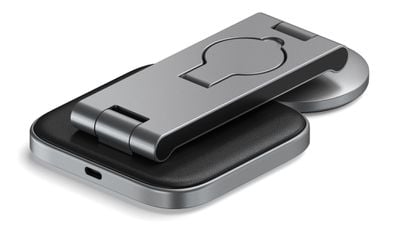
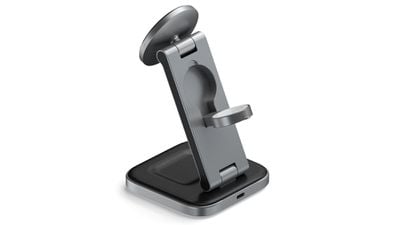
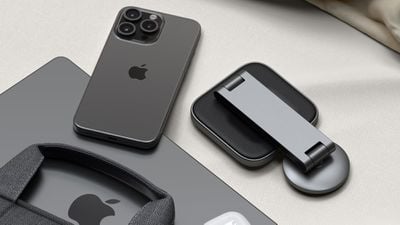
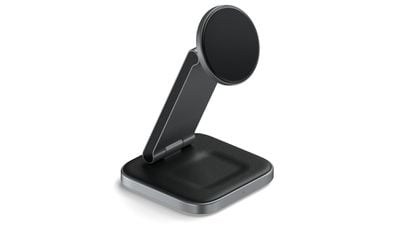
Both of the Satechi Wireless Charging Stands have the same design, featuring a square wireless charging pedestal for the AirPods, an arm attached by a hinge, and a round magnetic wireless charger for the iPhone. The 3-in-1 model adds a fold-out Apple Watch charger to the back of the arm.
These chargers collapse down flat, which makes them convenient to tuck into a bag or backpack, but the aluminum they're made from is on the heavy side. The option to fold them down is a plus, but because of the weight, they may not be a better option than something like Mophie's 3-in-1 travel charger.
The folding design is, however, a major improvement over most chargers, so if you want something that works well both on a desktop and when traveling, Satechi's Qi2 options are worth looking at. Compared to a flat charger, being able to unfold the arm and have an upright charger is useful because it enables features like StandBy on the iPhone and Night Stand mode on the Apple Watch.
The base of each charger has a soft-touch vegan leather material and a little divot where the AirPods are meant to go. The iPhone charging puck also has a soft-touch silicone to ensure that it doesn't scratch the iPhone, and the Apple Watch charger is made from a standard white plastic.
With the aluminum build, the chargers look like quality products, and they'll match well with most desk setups. It is worth noting that Satechi is only selling these in space gray, so if you prefer silver aluminum or shades of white, that's not an option.
The best part about Satechi's Charging Stands is the Qi2 charging puck. It's attached to the arm of the device using a hinge, so the charger can be set to several different angles. It can be positioned straight up so it's essentially a flat charging surface, or tilted down all the way to take up minimal space. In between, there are angles ideal for watching videos or FaceTiming. As with most upright magnetic chargers, the Charging Stands can be used with the iPhone positioned in landscape or portrait orientation. Satechi says that the hinges on the stand won't weaken over time, and they do seem firm while still being easy to manipulate.
In testing, Satechi's Qi2 Charging Stands worked like MagSafe charging stands. The iPhone is able to attach magnetically, and charging speeds were about the same as MagSafe. The iPhone did get a little warm a few times, but that also happens with MagSafe chargers. Over a 30-minute period, an iPhone 15 Pro Max was able to charge from 22 percent to 52 percent, for a 30 percent total charge.
The AirPods charging spot charges the AirPods at 5W, and the 3-in-1 version's Apple Watch charger is a fast charger so it can charge the Apple Watch Series 7 and later and the Ultra models at the quickest speed. There is a small light at the front of the charger when it is in use, but it is not overly bright.
For powering the Charging Stands, there's a USB-C port at the back, which is nice because the cable can be swapped out if it becomes damaged or if you need a cable of a different length. The more expensive 3-in-1 charger includes a 45W power adapter and interchangeable plugs for international travel, and both models come with a plain black USB-C cable.
One of the benefits of Qi2 is lower prices, but Satechi's Wireless Charging Stands are still expensive. The 3-in-1 model is priced at $130, likely because Satechi is still licensing Apple Watch charging technology from Apple, while the 2-in-1 Wireless Charging Stand is $80. For the build quality and the versatility afforded by the hinged design, the pricing does not seem unfair, and Satechi's 3-in-1 is $20 cheaper than MagSafe-based 3-in-1 charging options sold by Apple.
The 3-in-1 Foldable Qi2 Wireless Charging Stand is priced at $130, while the 2-in-1 Foldable Qi2 Wireless Charging Stand is priced at $80. Both products can be purchased from the Satechi website as of today.
Note: Satechi provided MacRumors with the 3-in-1 and 2-in-1 Qi2 Wireless Charging Stands for the purpose of this review. No other compensation was received.
Apple Card users can get extra Daily Cash back this week for Nike purchases thanks to a special Apple Pay promotion Apple is running with Nike.
From April 25 through May 2, Apple Card owners will get 10 percent Daily Cash back on Nike purchases made using Apple Pay. The deal is available on the Nike website, the Nike app, and at U.S. Nike Stores.
Customers can earn up to $50 back, which means the extra cash is available for up to $500 in purchases.
Daily Cash is a benefit available to Apple Card owners. With each purchase, immediate cash back rewards are available. Apple typically provides two percent cash back for Apple Pay purchases, three percent for Apple Pay purchases at Apple locations, and one percent for everything else. Some retailers, such as Nike, have special deals with Apple where users can get three percent cash back.
The limited time deal is a seven percent total increase in Daily Cash back on Nike purchases.
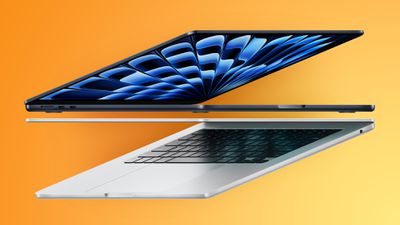
Best Buy is discounting a collection of M3 MacBook Pro computers today, this time focusing on the 14-inch version of the laptop. Every deal in this sale requires you to have a My Best Buy Plus or Total membership, although non-members can still get solid second-best prices on these MacBook Pro models.
Note: MacRumors is an affiliate partner with Best Buy. When you click a link and make a purchase, we may receive a small payment, which helps us keep the site running.
Only M3 models are being discounted to notable all-time low prices during this sale, although the higher-end M3 Pro and M3 Max MacBook Pros are seeing a few second-best prices. In terms of the 14-inch M3 MacBook Pro, there are three total models on sale right now at Best Buy. The cheapest model is the 512GB M3 model at $1,399.00, down from $1,599.00.
Note: My Best Buy Plus/Total membership required to see final deal price.
For anyone who doesn't have My Best Buy Plus or Total, you can still get $150 off the 14-inch M3 MacBook Pro. These MacBook Pro models launched last October, featuring mini-LED displays, MagSafe fast charging, Wi-Fi 6E, a six-speaker sound system, and more.
Be sure to visit our full Deals Roundup to shop for even more Apple-related products and accessories.
Apple's latest iPhones include several headline camera features that are worth using, such as Portrait Mode and Photographic Styles. But if all you want to use is the standard photo mode, there are still several tools and settings that can improve the composition of your pictures and help you capture the perfect shot using more traditional techniques.
Whether you are the owner of a new iPhone or a longtime user looking to up your photography game, here are six camera tools and settings in iOS that are worth checking out and experimenting with.
1. Use the Rule of Thirds
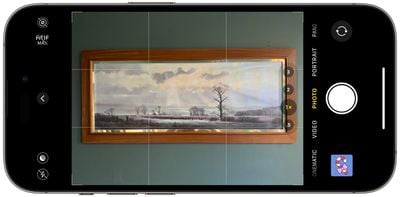
For a while now, Apple's Camera app has included a few optional settings that can help you line up your shots. Foremost in these settings is the Grid tool, which should be used when applying the rule of thirds. It divides the frame of your photo into a grid with two horizontal lines and two vertical lines, creating nine equal parts.
The rule of thirds helps guide the viewer's eye to the most important parts of your photo and creates a more harmonious composition. Here's how to overlay a grid on the viewfinder.
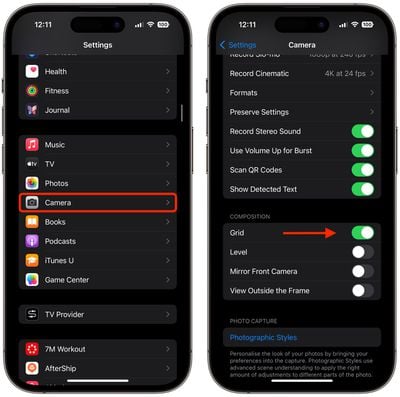
Open the Settings app on your iPhone.
Scroll down and tap Camera.
In the "Composition" section, toggle on the switch next to Grid.
Here are five things to keep in mind when using the grid to apple the rule of thirds.
Identify the Key Elements: First, identify the main subjects or elements in the scene you want to photograph. These could be a person, a building, a tree, or any focal point.
Positioning the Subjects: Place these key elements along the lines or at the points where the lines intersect. For instance, if you're taking a photo of a person, you might position them along one of the vertical lines, rather than in the center of the frame.
Horizontal Elements: For horizontal elements like the horizon in a landscape, align them with one of the horizontal lines. For a more dramatic sky, place the horizon on the lower line. For more emphasis on the land or sea, place it on the upper line.
Balancing the Image: Use the rule of thirds to balance your photo. If you place a subject on the left, consider having something of lesser importance on the right to create a sense of balance.
Experimentation: While the rule of thirds is a guideline, it's not a strict rule. Feel free to experiment with it and see how shifting elements in your frame changes the photo's impact.
2. Straighten Top-Down Shots
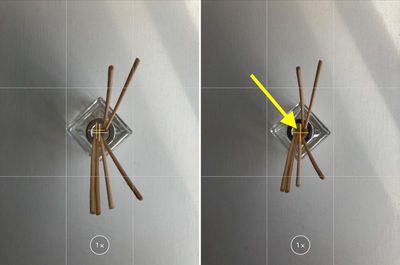
If you're taking a picture of something from above like a plate of food or an ornament on the ground, consider using the camera level, as it helps you capture a balanced shot without having to use a tripod arm or mount. It's also useful for taking a shot of something directly above you, like an object on the ceiling or in the sky.
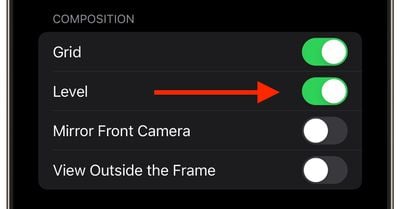
The camera level tool used to be part of the Grid overlay, but Apple separated out the function in iOS 17, and it now has its own switch: Open the Settings app on your iPhone, select Camera, then toggle on the switch next to Level. Now you are ready to use it.
Open the Camera app, and set the capture mode to Photo, Portrait, Square, or Time Lapse, using the sliding menu above the shutter button.
Point the camera straight down above your subject (or straight up if the subject/scene you want to capture is above you).
Line up the floating crosshair with the fixed crosshair in the center of the screen by adjusting the angle of your phone's camera. The crosshairs will both glow yellow when in perfect alignment.
Tap the shutter button to capture the shot.
The aligned crosshairs turn yellow (right), indicating the lens is parallel with the ground.
3. Straighten Your Horizontal Shots
By making the Level tool an individual option in iOS 17, Apple has also included an additional horizontal level for more traditional straight-on photos.
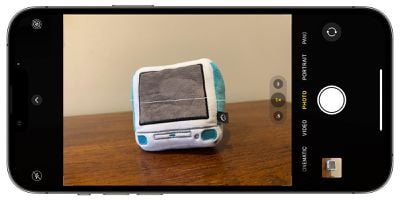
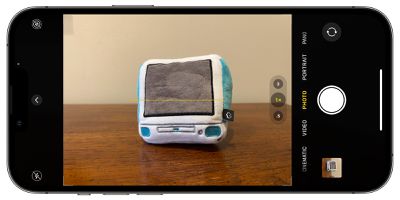
Turning the Level option on makes a broken horizontal line appear on the screen when your iPhone senses that you're lining up for a straight-on shot and you tilt your device slightly out of horizontal. The line appears white while your phone is out of level and then turns yellow once you achieve a level orientation to indicate success.
With the Level setting enabled (Settings ➝ Camera ➝ Level), try it for yourself. Open the Camera app and try shooting a subject at a straight angle, and you should see the broken horizontal lines in the center of the viewfinder. Straighten your angle up to connect the lines and make a single yellow line.
The leveling pop-up only appears briefly and only within a narrow range of angles close to horizontal (in either portrait or landscape orientation), so it won't intrusively pop up when you're intentionally trying to take a photo at an angle.
4. Take Burst Photos
Burst Mode refers to when the camera on your iPhone captures a series of photos in rapid succession, at a rate of ten frames per second. It's a great way to shoot an action scene or an unexpected event, since you're always more likely to end up with the picture you were aiming for.
To shoot in Burst Mode, simply long press on the Volume Up button and your iPhone will take a series of photos in quick succession. Notice that a counter increases inside the on-screen shutter button for as long as you hold down the volume button. This indicates how many shots are being captured in the current burst. Simply take your finger off the volume when you want to end the burst of shots.
When you take a series of burst photos, they automatically appear in the Photos app under the Album name Bursts. You'll also find them in your main Photo Library. Follow the link to learn how to view and select the best of your Burst photos in the Photos app.
5. Mirror Your Selfies
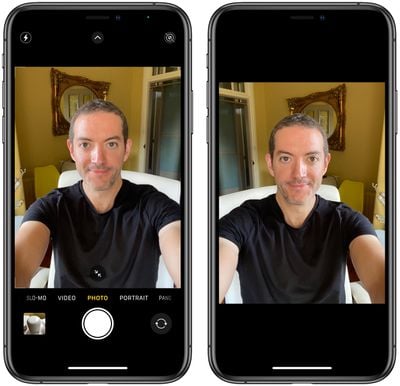
When you take a selfie with your iPhone using the Camera app, it automatically flips – or mirrors – the image so that it's an inverted version of the mirror image you see in the preview before you take the shot.
This can look odd, since it makes a big difference to how selfies look. It can also be annoying, since most third-party social media apps automatically take mirrored selfies, which means you're more likely to be used to the mirroring functionality than the flipped selfies that your iPhone takes.
Fortunately, you can change this default behavior of the Camera app, meaning that you can get the mirrored selfie you're probably more accustomed to seeing. Here's how.
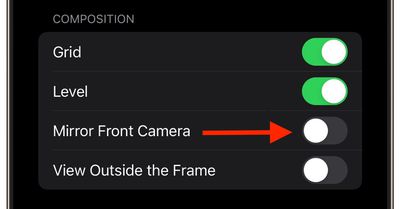
Launch the Settings app, then scroll down and select Camera.
Toggle the switch next to Mirror Front Camera to the green ON position.
That's all there is to it. From now on when you use the Camera app to shoot a selfie, you'll capture the same shot that you saw in the app's preview mode.
6. View Outside the Frame
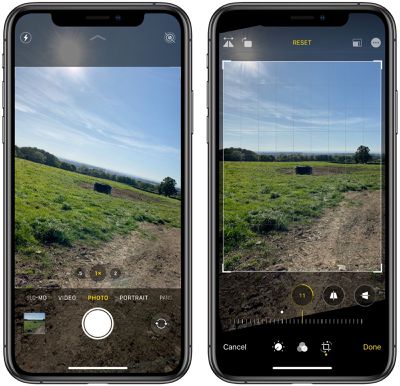
On iPhone 11 and later models, there is an optional camera setting that allows you to see what is outside the bounds of your photo's frame, so you can correct the alignment of photos (and videos) without having to resort to cropping.
With the "View Outside the Frame" setting enabled, when shooting using the wide lens or the telephoto lens, the camera will simultaneously shoot using the next widest sensor. So the wide lens is active when you shoot with the telephoto lens, and the ultra-wide is active when you shoot with the wide.
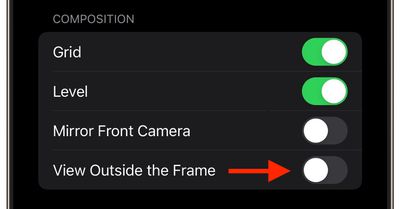
Open the Settings app.
Scroll down and tap Camera.
Under the "Composition" section, toggle on the switch next to View Outside the Frame.
You may have to play around with zoom levels to switch between lenses, but you'll know the feature is active when the camera interface turns semi-transparent to reveal the surroundings outside of the viewfinder.
Apple today sent an email to some iPhone Upgrade Program members to inform them that their previously-completed iPhone trade-in has been "canceled," but the email was almost certainly sent in error based on the circumstances.
Apple told customers it never received their iPhone, even though they sent it in months ago. In many cases, the customers physically handed their iPhones to an Apple Store employee in person, so there is no possible way they could be at fault.
"Because you didn't trade in your iPhone, we are unable to complete the trade-in process," the email says, according to a screenshot shared with us by reader Quinn Everett. "The associated loan on this iPhone will resume."
Everett and others said the Apple Store app also shows their iPhone's trade-in status has changed to "canceled," suggesting that Apple's email is legitimate. The email has been widely shared across the MacRumors Forums, Reddit, and X, with many customers receiving it in the early hours of Thursday morning in the United States.
Many customers who received the email completed their iPhone trade-in last September, when the iPhone 15 series launched, so the delayed timing of the email suggests that it was sent as a result of a system glitch. Apple did not immediately respond to our request for comment, but we will update this story if we receive an explanation.
No but actually what is going on @Apple@AppleSupport? I got an email saying my trade-in from September was canceled and your Apple Store app is showing that too in one place, but not everywhere. Receipt of returned iPhone 14 Pro is below. I think there’s been a glitch. https://t.co/VXnpg5I13spic.twitter.com/H2LtcHwijl
— Quinn (@quinneverett) April 25, 2024
Update — 10:35 a.m. Pacific Time: We have confirmed that this email was sent erroneously and that customers who received it do not need to take any action.
Update — 11:51 a.m. Pacific Time: Apple has now sent a follow-up email to affected customers that says to "please disregard the previous email we sent."
Apple chipmaker TSMC has announced plans to produce highly advanced 1.6nm chips that could be destined for future generations of Apple silicon.
TSMC yesterday unveiled a series of technologies, including the "A16" process, which is a 1.6nm node. The new technology significantly enhances chip logic density and performance, promising substantial improvements for high-performance computing (HPC) products and data centers.
Historically, Apple is among the first companies to adopt new, state-of-the-art chip fabrication technologies. For example, it was the first company to utilize TSMC's 3nm node with the A17 Pro chip in the iPhone 15 Pro and iPhone 15 Pro Max, and Apple is likely to follow suit with the chipmaker's upcoming nodes. Apple's most advanced chip designs have historically appeared in the iPhone before making their way to the iPad and Mac lineups, and ultimately trickling down to the Apple Watch and Apple TV.
The A16 technology, which TSMC plans to begin producing in 2026, incorporates innovative nanosheet transistors along with a novel backside power rail solution. This development is expected to provide an 8-10% increase in speed and a 15-20% reduction in power consumption at the same speeds compared to TSMC's N2P process, alongside up to a 1.10x chip density improvement.
TSMC also announced the rollout of its System-on-Wafer (SoW) technology, which integrates multiple dies on a single wafer to boost computing power while occupying less space—a development that could be transformative for Apple's data center operations. TSMC's first SoW offering, which is already in production, is based on Integrated Fan-Out (InFO) technology. A more advanced chip-on-wafer version leveraging CoWoS technology is slated for readiness in 2027.
TSMC is also making progress toward manufacturing 2nm and 1.4nm chips that are likely destined for future generations of Apple silicon. Its 2nm "N2" node is scheduled for trial production in the second half of 2024 and mass production in late 2025, to be followed by an enhanced "N2P" process in late 2026. Trial production of the 2nm node will begin in the second half of 2024, with small-scale production ramping up in the second quarter of 2025. In 2027, facilities in Taiwan will start to shift toward production of "A14" 1.4nm chips.
Apple's upcoming A18 chips for the iPhone 16 lineup are expected to be based on N3E, while the "A19" for the 2025 iPhone models is expected to be Apple's first 2nm chip. The subsequent year, Apple will likely move to an enhanced version of this 2nm node, followed by the newly announced 1.6nm process.
Each successive TSMC node surpasses its predecessor in terms of transistor density, performance, and efficiency. Late last year, it emerged that TSMC had already demonstrated prototype 2nm chips to Apple ahead of their expected introduction in 2025.
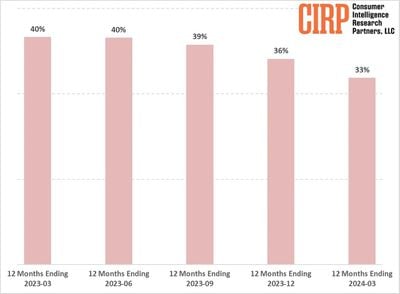
While CIRP notes that Apple's installed smartphone base is higher than recorded activations, the figures show its share of new iPhone activations fell from 40% to 33% over the past year, suggesting a shift away from the higher market shares Apple enjoyed in previous years.
Historically, around the time when competitors like Blackberry and Windows phones were more prevalent, iPhone's activation share hovered around one-third. This increased steadily until the first year of the COVID-19 pandemic when various factors contributed to a spike in activations. However, Apple's iPhone share appears to have reverted to its long-term average, with two out of three new smartphone activations now from Android devices.
CIRP suggests the decline is due to the increased price of modern smartphones as well as better durability. While innovation has slowed, there has been a shift from two-year subsidized purchases to more transparent buying plans, which has prompted consumers to hold onto their devices for longer. This trend appears to impact iPhone sales more significantly than those of Android devices, suggesting Apple may need to adjust its strategy to regain market momentum.
The report covers a 12-month period ending each quarter and includes data from CIRP's quarterly survey of mobile phone customers. The aim of this approach is to remove the seasonal spikes typically associated with new device launches and holiday sales, providing a clearer view of ongoing trends, according to the firm.
Most of us stare at our iPhones for far too long, and this constant exposure to a bright screen can strain our eyes, especially in low-light conditions or during the twilight hours. That's where the ability to dim your iPhone screen beyond the standard brightness settings becomes a game-changer.
If the screen of your iPhone or iPad is too bright for comfort, the usual solution is to go to Settings ➝ Display & Brightness and drag the Brightness slider to the left, or open Control Center and adjust the corresponding setting from there. However, if the lowest setting offered by the Brightness level just isn't dim enough for you, there's another way to make your screen even darker.
This feature is particularly useful if you find yourself needing to use your device in dark environments, such as in a bedroom where a partner is sleeping, or in a dimly lit theater. It's also a boon for anyone with light sensitivity, providing a more comfortable viewing experience that minimizes eye strain and fatigue. Let's look at how to set it up below.
Reduce White Point
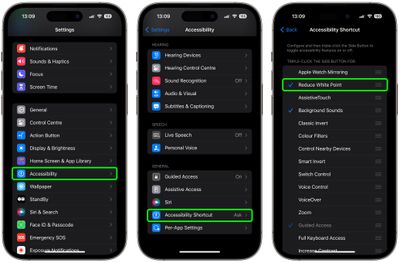
Open Settings on your iPhone.
Select Accessibility from the list of options.
Scroll down and select Accessibility Shortcut.
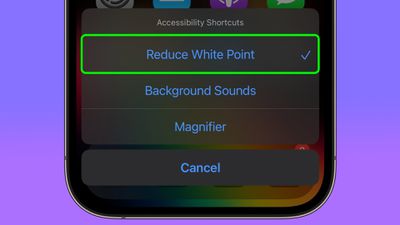
Tap Reduce White Point, then drag it up near the top of the list using the three lines icon.
Now that's set up, simply triple-click your iPhone's Side button to display the Accessibility Shortcut menu, then tap Reduce White Point.
Your iPhone display will now be dimmer than the dimmest setting offered by the standard Brightness level.
Reset White Point
To return the white point to its normal level, simply triple-click the Side button again and tap Reduce White Point to uncheck it.
Adjust White Point
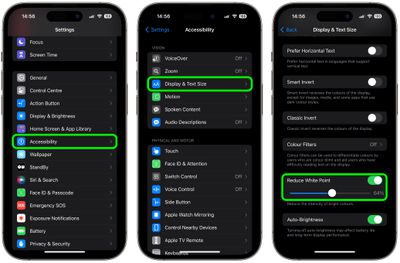
If the White Point is still too bright (or too dim), you can adjust it manually: In Settings, go to Accessibility ➝ Display & Text Size, then scroll down and turn on the switch next to Reduce White Point.
This will reveal a slider that you can move left or right to change the brightness level.
Trigger Reduced White Point at Bedtime
It's possible to make the Reduced White Point setting come on when Bedtime starts, or when your Sleep focus is enabled. This offers an automated approach to minimizing screen brightness, which is particularly beneficial for winding down before bedtime.
Blue light is known for its potential to disrupt natural sleep patterns by inhibiting the production of melatonin, a hormone crucial for sleep regulation. That makes an automation especially useful if you have a habit of reading or browsing on your iPhone as part of your nighttime routine, allowing you to do so without significantly impacting your sleep quality. Here's how it's done.
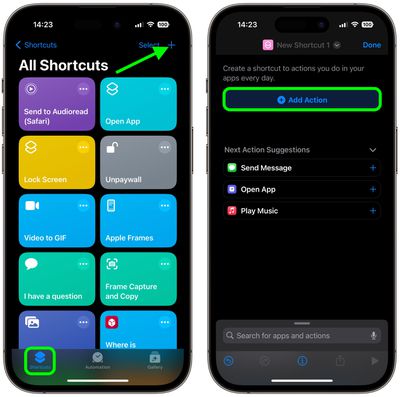
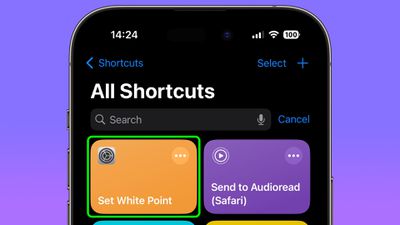
Open the Shortcuts app, then tap the + icon in the top-right corner of the screen.
Tap Add Action.
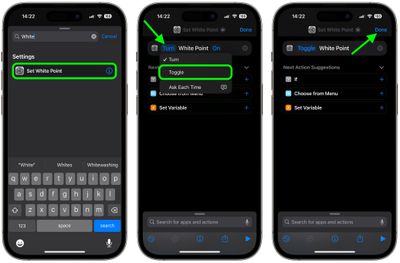
Type "White Point" in the search field, then choose Set White Point when it appears below.
Tap the blue "Turn" text, then choose Toggle from the dropdown menu.
Tap Done in the top-right corner of the screen.
After following the above steps, you should see your new "Set White Point" shortcut in the Shortcuts menu.
The Shortcut is now ready to use in a new custom automation. It's easy to make, just follow these steps.
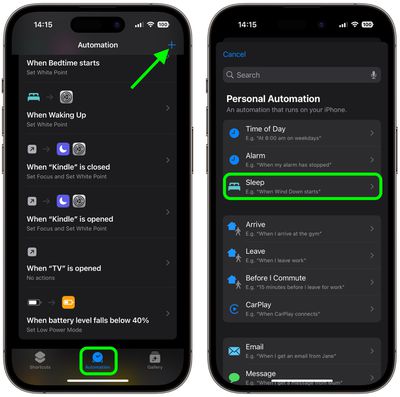
In the Shortcuts app, select the Automation tab, then tap the + icon in the top-right corner of the screen.
Under "Personal Automation," choose Sleep.
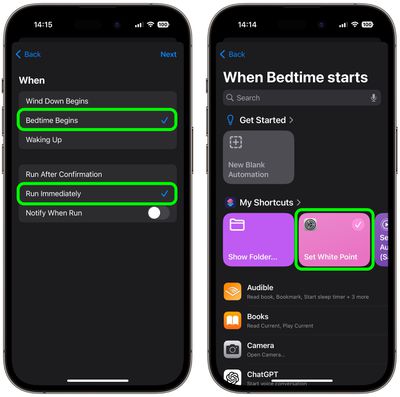
On the "When" screen, choose Bedtime Begins and Run Immediately, then tap Next.
On the "When Bedtime Starts" screen, choose your custom Set White Point shortcut.
You're all done. In the future, when Bedtime starts or when you enable the Sleep focus, your screen's white point will be automatically reduced.
Trigger White Point When Bedtime Ends
To make sure the white point on your iPhone's display is reset when bedtime ends in the morning, you just have to create an additional automation. This basically involves the same steps you just used to create the first custom automation, except instead of choosing Bedtime Begins in step 3, select Waking Up. Here are those steps again for your convenience, but with a modified step 3.
In the Shortcuts app, select the Automation tab, then tap the + icon in the top-right corner of the screen.
Under "Personal Automation," choose Sleep.
On the "When" screen, choose Waking Up and Run Immediately, then tap Next.
On the "When Bedtime Starts" screen, choose your custom Set White Point shortcut.
That's it! The white point on your iPhone display will now return to normal when your bedtime ends.
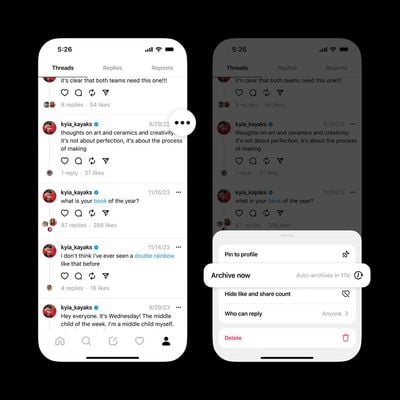
Threads is testing an option that allows users to archive old posts so that they don't appear on their profile, according to Instagram head Adam Mosseri.
In a post on the Meta-owned social media platform, Mosseri said that the archive option being tested with a small number of people included a manual setting for individual posts, as well as the ability to automatically archive all posts after a certain period of time.
Users also have the option to unarchive a post to make it public again. If beta testing goes well, the ability to archive posts is likely to be rolled out globally as an option rather than a default behavior, which Mosseri said was the overwhelming preference based on user feedback.
When it launched back in July, Threads was very barebones, with Meta working to add new functionality on a regular basis to bring the network in line with X (Twitter). It has since gained a web app, an ability to search for posts, and a post editing feature. Just last week, Threads began rolling out an option to some users to filter search results by the most recent posts, rather than just posts suggested by its algorithm.
The slow trickle of new features appears to be gradually paying off: The app now has more than 150 million monthly users, according to Mark Zuckerberg, who revealed the figures on Wednesday during Meta's first-quarter earnings call.
The number indicates an increase of about 20 million new users since February, suggesting steady growth, albeit at a slower rate than its initial rapid popularity, when the app racked up 100 million users in its first week. Zuckerberg said in October he believes Threads has a good chance of becoming Meta's next billion-user app.
Apple today released a new update for Safari Technology Preview, the experimental browser Apple first introduced in March 2016. Apple designed the Safari Technology Preview to test features that may be introduced into future release versions of Safari.
Safari Technology Preview 193 includes fixes and updates for Accessibility, CSS, Forms, JavaScript, Rendering, Web API, and Web Inspector.
The current Safari Technology Preview release is compatible with machines running macOS Ventura and macOS Sonoma, the latest version of macOS that Apple released in September 2023.
The Safari Technology Preview update is available through the Software Update mechanism in System Preferences or System Settings to anyone who has downloaded the browser. Full release notes for the update are available on the Safari Technology Preview website.
Apple's aim with Safari Technology Preview is to gather feedback from developers and users on its browser development process. Safari Technology Preview can run side-by-side with the existing Safari browser and while designed for developers, it does not require a developer account to download.
Meta-owned messaging platform WhatsApp today announced that it is rolling out support for passkeys on iOS, a feature that will let WhatsApp users log in to their accounts on iOS devices using Face ID, Touch ID, or their device passcode.
Passkeys serve as a replacement for a traditional password, and because device authentication is required, passkeys put a stop to online attacks like phishing. With a passkey, there's no password to steal, and no one-time SMS or authentication code that can be intercepted.
Passkeys are also more convenient, because logins are done with a quick Face ID or Touch ID scan rather than a password. WhatsApp passkeys can be enabled by opening up the app settings, choosing the Account section, and tapping on "Passkeys."
Apple has supported passkeys since 2022, and they work on devices that run iOS 16 and later, iPadOS 16 and later, and macOS Ventura and later. Many companies have been implementing support for passkeys, including X (formerly Twitter), Google, TikTok, PayPal, Best Buy, Microsoft, PlayStation, and eBay.
DigiDNA today announced the launch of iMazing 3, an updated version of its iPhone and iPad management software designed for Macs and Windows machines.
iMazing 3 features an updated user interface with a dedicated "Discover" section that makes it easier to find popular tools for doing things like transferring photos from an iPhone, downloading Messages, transferring music, and making backups.
A Device Overview section offers details about connected products like serial number, model number, device ID, date of latest backup, and more, for simple multi-device management, and there's also a Data section for accessing saved media, messages, contacts, and other content.
For battery management, there is a battery section that provides details on current temperature, design max charge, effective max charge, and charge cycles, plus there are options for managing storage.
The iMazing 3 software on Mac works with the Vision Pro in addition to the iPhone and the iPad, and there is support for remote pairing. Other new features include a Dark Mode, improved Backup and snapshot management, and a redesigned settings interface.
iMazing 3 can be downloaded from the iMazing website at prices starting at $40. iMazing customers who purchased the software after October 20, 2020 can upgrade for free, and those with older licenses can upgrade at a 50 percent discount.
Apple today released several open source large language models (LLMs) that are designed to run on-device rather than through cloud servers. Called OpenELM (Open-source Efficient Language Models), the LLMs are available on the Hugging Face Hub, a community for sharing AI code.
As outlined in a white paper [PDF], there are eight total OpenELM models, four of which were pre-trained using the CoreNet library, and four instruction tuned models. Apple uses a layer-wise scaling strategy that is aimed at improving accuracy and efficiency.
Apple provided code, training logs, and multiple versions rather than just the final trained model, and the researchers behind the project hope that it will lead to faster progress and "more trustworthy results" in the natural language AI field.
OpenELM, a state-of-the-art open language model. OpenELM uses a layer-wise scaling strategy to efficiently allocate parameters within each layer of the transformer model, leading to enhanced accuracy. For example, with a parameter budget of approximately one billion parameters, OpenELM exhibits a 2.36% improvement in accuracy compared to OLMo while requiring 2x fewer pre-training tokens.
Diverging from prior practices that only provide model weights and inference code, and pre-train on private datasets, our release includes the complete framework for training and evaluation of the language model on publicly available datasets, including training logs, multiple checkpoints, and pre-training configurations.
Apple says that it is releasing the OpenELM models to "empower and enrich the open research community" with state-of-the-art language models. Sharing open source models gives researchers a way to investigate risks and data and model biases. Developers and companies are able to use the models as-is or make modifications.
The open sharing of information has become an important tool for Apple to recruit top engineers, scientists, and experts because it provides opportunities for research papers that would not normally have been able to be published under Apple's secretive policies.
Apple has not yet brought these kinds of AI capabilities to its devices, but iOS 18 is expected to include a number of new AI features, and rumors suggest that Apple is planning to run its large language models on-device for privacy purposes.
Spotify has not been able to get Apple to approve an EU app update that added information on subscription pricing and links to the Spotify website, and it turns out that's because Spotify has not agreed to the terms of Apple's Music Streaming Services Entitlement.
A recent antitrust ruling from the European Commission fined Apple nearly $2 billion and mandated that Apple "remove anti-steering provisions" for music apps in the European Economic Area (EEA). As a result, Apple updated its App Store rules with a Music Streaming Services Entitlement that allows music apps in the EEA to inform users of other ways to purchase digital music content or services and to add website links for purchasing digital music subscriptions.
That might sound like a win for apps like Spotify, but Apple requires developers who use the entitlement to pay a 27 percent fee (reduced for subscriptions older than one year and for small businesses) on all website purchases referred by Apple. So if Spotify puts a link in its app and a user clicks it and subscribes, Spotify would owe Apple a 27 percent commission (three percent less than the App Store purchase fee).
Spotify does not currently pay Apple any money, and it does not want to. Directly after the European Commission's ruling, Spotify on March 5 submitted an EU app update that had information on subscription pricing and links to its websites for customers to make purchases. This was prior to when Apple had announced its entitlement plan.
Apple ignored Spotify's app update, and Spotify complained on March 14 that Apple had not "acknowledged or responded" to its App Store submission. Spotify at the time called on the European Commission to force Apple to approve its app update.
Apple kept ignoring Spotify's submission, until today, when Spotify submitted a new version of its app. Spotify said on X (formerly Twitter) that the update has no links and includes just the "bare minimum" on pricing and a mention that subscriptions can be purchased from Spotify, which it claims is acceptable under the European Commission's ruling.
Spotify left out a small detail, though. It turns out that Spotify did not request a Music Streaming Services Entitlement and did not agree to Apple's new terms for the entitlement. The App Store Review Team sent Spotify a letter (via AppleInsider) that says the entitlement is required even though there is no link because Spotify's submission has a call to action to purchase a Spotify subscription on its website.
We are reaching out to let you know about new information regarding your app, Spotify - Music and Podcasts, version 8.9.33.
As you may be aware, Apple created a new Music Streaming Services Entitlement (EEA) for iOS and iPadOS music streaming apps offered in EEA storefronts. The entitlement allows music streaming apps to use buttons, external links, or other calls to action to direct customers to a purchase mechanism on a website owned or controlled by the developer. You must accept its terms before adding any of these capabilities to your app. Please find more information about the entitlement here.
We note that your current submission includes a call to action to purchase a Spotify subscription on your website. As such, you must accept the terms of the Music Streaming Services Entitlement (EEA) and include the entitlement profile in your app for submission. To be clear, this entitlement is required even if your app does not include an external link (nor does it require that you offer an external link). We will, however, approve version 8.9.33 after you accept the terms of the Music Streaming Services Entitlement (EEA) and resubmit it for review.
If you have any questions about this information, please reply to this message to let us know.
Apple says that if Spotify agrees to the terms of the Music Streaming Services Entitlement, it will approve the latest Spotify app update. Without a link to the Spotify website, Spotify would presumably not have to pay Apple a commission because there would be no way for Apple to track clicks from its app to Spotify, but there may be some other part of the entitlement that Spotify is reluctant to agree to.
Apple does not plan to let Spotify include a link to the Spotify website without paying the required 27 percent fee, but adding subscription pricing information without a link does seem to be permitted per the language of Apple's letter to Spotify. In a statement to MacRumors, Spotify said that Apple is defying the EC's ruling.
Apple has once again defied the European Commission’s decision, rejecting our update for attempting to communicate with customers about our prices unless we pay Apple a new tax. Their disregard for consumers and developers is matched only by their disdain for the law.
Spotify has confirmed that it does not plan to opt in to Apple's EU App Store business terms, which are separate from the Music Streaming Services Entitlement and are part of the changes that Apple implemented as required by the Digital Markets Act.
Because Spotify does not want to agree to the EU App Store business terms, it is limited on the features that it can add to its app in the EU. To offer the Spotify app directly from its website in the EU, Spotify would need to agree to the terms and would have to pay a 0.50 euro Core Technology Fee for users that download the app.
Spotify does not let customers sign up for a Spotify subscription in the app as of right now, so it does not have to pay anything. Web-based distribution and linking out to the Spotify website both have associated fees, and Spotify is aiming for a solution where it does not have to pay anything. Though Spotify has a clear path to get its app update approved, the company believes that Apple is breaking European law by charging the 27 percent fee for links and it calls on the European Commission to "enforce its decision."
Apple Arcade games Crossy Road Castle and Solitaire Stories are set to launch on the Vision Pro headset tomorrow, adding two additional popular games to Apple's first head worn device.
In Crossy Road Castle, players can progress through tower levels with pinch and flick gestures. Up to four players can play at one time, though there's also a solo version of the game.
Crossy Road Castle for Vision Pro has the same features as the other versions of the game, including characters and hats to unlock, game controller support, and challenge events to complete. Levels are procedurally generated, so each new game is different.
Solitaire Stories provides players with a virtual card table to play classic solitaire games. There are multiple versions of solitaire included, such as Klondike Quick Play, Spider, and Draw 3, as well as support for online multiplayer gameplay.
The game includes a progressive story with increasingly difficult levels, along with different deck designs to unlock. There are also daily challenges and contests.
Several Apple Arcade games available on iOS and macOS are receiving updates today, including Puyo Puyo Puzzle Pop, Cooking Mama: Cuisine, Fruit Ninja Classic, and Zookeeper World.
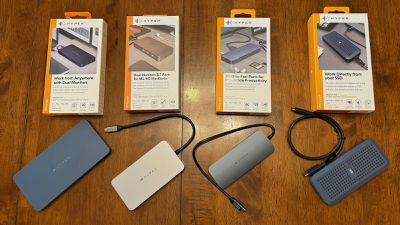
Several months ago, Hyper introduced a series of accessories under the "HyperDrive Next" family, bringing a variety of options for USB-C hubs and other products. I've recently spent some time testing out some of these accessories, and I've found them to offer an assortment of capabilities across price points to suit a variety of users.
USB4 NVMe SSD Enclosure
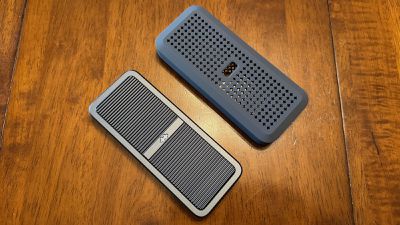
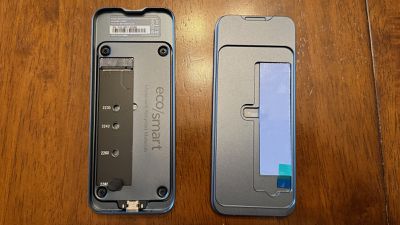
Priced at $119.99, Hyper's USB4 NVMe SSD Enclosure offers support for a speedy external drive inside a robust aluminum enclosure protected by a silicone bumper to cushion against impacts and provide IP55 dust and water resistance. The enclosure supports M.2 NVMe PCIe Gen 4/3 SSDs up to 16 TB with a snap-in installation process that requires no screws. SSDs in 2230/2240/2260/2280 sizes are supported.
For testing, I paired Hyper's enclosure with a 2TB WD_BLACK SSD that supports up to 7,300 MB/s transfer speeds, allowing me to push the enclosure to its limits without being capped by the SSD. The installation process was as simple as advertised, and all I had to do was pop open the enclosure by hand, slide the SSD into the drive slot, secure it with a rubber secure grip, peel off the protective film on a preinstalled thermal pad, and close everything back up. An extra thermal pad and secure grips are provided in the box in case you need them.
A 0.5-meter USB4 cable is included with the enclosure, and upon plugging the enclosure in to my MacBook Pro, I was able to quickly format it for APFS with Disk Utility to work with macOS. An illuminated Hyper logo on the enclosure shines through an opening in the silicone bumper, giving you some information about drive status. The logo shines a steady white when the enclosure is powered on and the drive is idle, and it blinks while data is being read from or written to the SSD. The logo will blink red if detects an SSD is not connected.
Hyper says the enclosure supports up to 3,800 MB/s transfer speeds, and in my testing with a 16-inch M1 Pro MacBook Pro I saw both read and write speeds registering around 3,100 MB/s with the WD SSD. That's plenty fast for most users, allowing for fast file transfers and even the ability to work with large projects directly from the external drive. I was able to copy a ~28 GB folder with roughly 17,500 items in it to the drive in around 15 seconds.
The enclosure gets slightly warm even when not in active use, with the finned aluminum design of the enclosure and small Hyper logo-shaped holes in the silicone bumper helping move heat away from the drive. The heat was not a concern in any of my testing, as it remained comfortable to touch.
Overall, I was pleased with the performance of the enclosure, and it's a convenient solution for backing up data or just adding extra storage. At $119.99 before adding in the cost of the SSD itself, it's pricier than some other solutions, but when you consider the higher-end specs it offers, it's within the same price range as many other options from trusted brands.
Hyper is currently sold out of the SSD enclosure on its own site, but does have it available through Amazon.
10 Port USB-C Hub
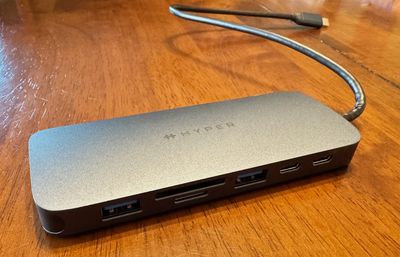
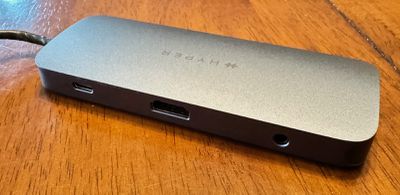
At the low end of Hyper's USB hub range is the 10 Port USB-C Hub priced at $99.99. It includes support for a single external display at 4K60Hz over HDMI while offering a pair of 10 Gbps USB-C ports, two USB-A ports (one at 10 Gbps and one at 5 Gbps), SD and microSD 4.0 card slots supporting up to a theoretical maximum of 312 MB/s, Gigabit Ethernet, and a 3.5 mm combo audio jack.
There's also a USB-C port with PD support at up to 140 watts, allowing for passthrough power to your computer if you hook up an external power adapter. Otherwise, the hub will run in bus-powered mode off of your computer. The hub connects to the attached computer over an integrated USB-C cable, which ensures you always have the proper cable with you but introduces a potential failure point for the whole accessory. The cable does feel fairly thick and sturdy with some strain relief reinforcement around where it enters the hub, so hopefully it will remain durable over the long term.
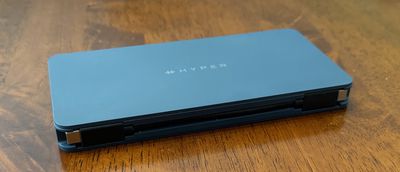
This is a compact, lightweight (97 grams) hub in a very dark gray or almost midnight aluminum finish, and in my testing it's proven to be a solid option for on-the-go use cases. It slips easily into a computer bag or sleeve and offers a really nice selection of ports to help you make use of a wide variety of accessories you might run across.
With support for a single external display, this may not be for true power users, but the vast majority of people are likely to only need to connect to a single display, especially in travel environments where this hub excels. A more powerful dock with additional display support and even more ports would likely suit these users better at more fixed home and office locations.
Hyper is currently sold out of the 10 Port USB-C Hub on its own site, but it is available through Amazon and Best Buy.
Dual 4K HDMI 7 Port USB-C Hub
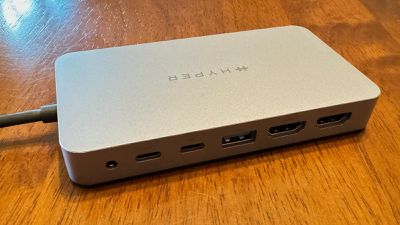
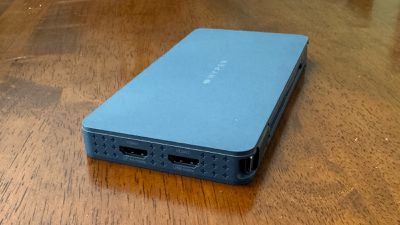
Hyper's mid-range Dual 4K HDMI 7 Port USB-C Hub priced at $149.99 offers fewer ports than the lower-end model but with enhanced display support. It includes two HDMI ports (one HDMI 2.0 at 4K60Hz and one HDMI 1.4 at 4K30Hz), a pair of 10 Gbps USB-C 3.2 Gen 2 ports, a single 10 Gbps USB-A port, a 3.5mm combo audio jack, and a USB-C port allowing you to optionally connect a PD 3.0 power adapter of up to 100 watts for passthrough charging of up to 85 watts to a connected computer. If you don't want to connect a power adapter, the hub will run in bus-powered mode from the attached computer, so no external power brick is needed.
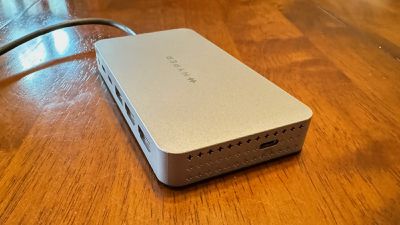
The design is an unobtrusive space gray plastic with subtle Hyper branding on the top. An integrated USB-C cable on one side connects to the host computer, while the available USB-C passthrough power port is on the opposite side. All other ports are on the rear of the hub, allowing for a relatively clean look on a desk. There are several rows of tiny Hyper logos on the ends of the hub, with the top row on each end being ventilation holes. The integrated cable is convenient for ensuring your cable is always at hand, but if it frays or otherwise breaks, the hub is rendered useless. It does appear quite durable based on my time with it though.
Given that this is a hub rather than a wall-powered desktop dock, it's ideal to take on the go to connect to displays and other devices as needed. While dual external displays are supported over the HDMI ports, it's important to note that USB bandwidth limitations means that only one of the displays can run at 60Hz, with the other running at 30Hz. This is likely fine for less demanding productivity tasks, but definitely something to be aware of if you're hoping to drive displays with heavier demands.
The inclusion of two USB-C ports with 10 Gbps transfer speeds is nice for connecting external drives and other modern devices, while the USB-A port offers legacy connectivity. I prefer a couple of USB-A ports on my full-time desktop dock due to a number of accessories I use that have integrated USB-A cables or proprietary charging connectors that use USB-A at the other end, but for a portable solution, this hub does the trick just fine.
I connected the USB4 NVMe SSD Enclosure via this hub, and it unsurprisingly impacted performance of the SSD as it was now sharing bandwidth other accessories, potentially including displays. I was still able to get write speeds of around 975 MB/s and read speeds of 850 MB/s, which should be sufficient for most users' needs.
The Dual 4K HDMI 7 Port USB-C Hub offers a number of connectivity options primarily aimed at users on the go, but you'll need to ensure it suits your needs. It's on the pricier side of USB hubs at $149.99, so make sure you need all of its capabilities and can't get away with a cheaper and simpler option. But on the flip side, the display limitations mean demanding users may want to look at other solutions such as separately connecting multiple displays to their computers for maximum performance.
Hyper is currently listing the Dual 4K HDMI 7 Port USB-C Hub as on sale for $104.99 on its own site, though it is currently out of stock. Amazon has it available for the regular price of $149.99, but hopefully Hyper gets this model back in stock soon at the sale price.
10 Port Business Class USB-C Dock
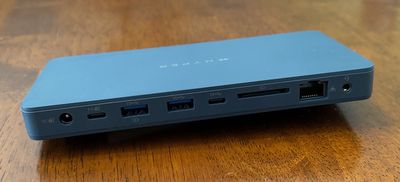
For those looking for more capabilities, Hyper offers the $199.99 10 Port Business Class USB-C Dock. While this dock has the same dual display capabilities of one HDMI 2.0 port at 4K60Hz and one HDMI 1.4 port at 4K30Hz, it offers a different combination of other ports. As a business-focused dock, there's a heavier emphasis on legacy connectivity such as two USB-A ports, both of which run at up to 10 Gbps. The extra USB-A port is offset by the inclusion of only a single downstream USB-C port, which also runs at 10 Gbps.
In addition to the same 3.5mm combo audio jack as on the 7-port hub, the 10-port model includes a Gigabit Ethernet port and an SD 4.0 card slot supporting transfer speeds up to 312 MB/s, In another nod to the business market, Kensington and Kensington Nano lock slots are included to help physically secure the dock.
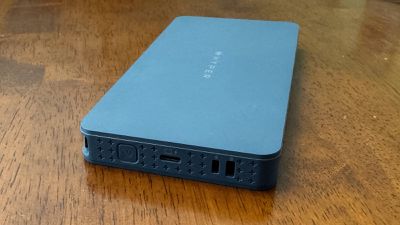
The dock connects to the host computer via a short detachable USB-C to USB-C cable, which conveniently snaps into the edge of the dock for travel, so this is a great balance of convenience and repairability. While the dock can be bus powered over this connection, you can also provide external power to the dock that can pass through to your laptop. The dock allows for power input via either USB-C or a DC barrel connector, but an external power adapter is not provided with the dock.
I experienced no issues in my testing, with the dock reliably driving two displays, keeping in mind that the 30Hz refresh rate on the second display may be insufficient for some uses. Productivity users are, however, unlikely to notice any issues due to that limitation. Ethernet and USB connectivity worked as advertised.
SD card reader speeds also appeared as advertised, with my test card nearing its maximum specs at write speeds of 125 MB/s and read speeds of around 220 MB/s.
While the 10 Port Business Class USB-C Dock is priced at $199.99 at Hyper, Best Buy is currently offering it for a discounted price of $159.99.
Wrap-up
Overall, Hyper offers a nice selection of USB-C hubs and docks to suit a variety of needs. While they don't have quite the capabilities of a Thunderbolt dock, they can provide good options for port expandability both on the go and in a desktop situation.
The USB4 SSD Enclosure supports the latest USB standard for high read and write speeds that should satisfy almost all users, and it comes in a compact package ideal for extra portable storage. Just make sure the SSD you're using can take advantage of the speeds the enclosure has to offer.
Note: Hyper provided MacRumors with the hubs, dock, and SSD enclosure for the purposes of this review. No other compensation was received. MacRumors is an affiliate partner with Hyper, Amazon, and Best Buy. When you click a link and make a purchase, we may receive a small payment, which helps us keep the site running.
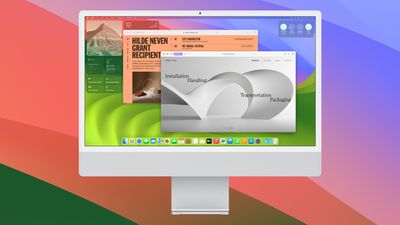
Apple today seeded the third beta of an upcoming macOS Sonoma 14.5 update to public beta testers, allowing non-developers to test the software ahead of its launch. The public beta comes a week after Apple released the second public beta and a day after Apple seeded the beta to developers.
Beta testers can opt-in through the Software Update section of the System Settings app. Under Beta updates, simply toggle on the Sonoma Public Beta. Note that you must sign up to participate on Apple's beta testing website.
There have been no new features found in the macOS Sonoma 14.5 developer betas so far, and Apple listed no additions in its release notes. It is likely that the update focuses on bug fixes and other small under-the-hood improvements.










 Note: MacRumors is an affiliate partner with Best Buy. When you click a link and make a purchase, we may receive a small payment, which helps us keep the site running.